
In Mediarails you will notice that there are two sections nestled within each of the Partners and Prospects workspaces:
Partners Workspace
-
- Partners
- Partners by brand
Prospects Workspace
-
- Prospects
- Prospects by brand
The data in both sections is the same, only the presentation of the data is different.
For example, in the Partners section and the Partners by brand section, the same partners are present. The difference is how the records are shown.
If your company has a single brand or only 1-2 brands, you will likely only use the Prospects and the Partners by brand sections.
If your company has multiple brands, or is an agency managing multiple brands on one account, you might use all 4 sections as needed.
See below for descriptions of each section
Prospects
- Primary workspace of individual companies
- Used by agencies and multi-brand companies in conjunction with the Prospects by Brand workspace
Function:
A summary of recruiting activities by each Prospect in a single entry. All brands associated will be rolled up into the single Prospect record like shown below:
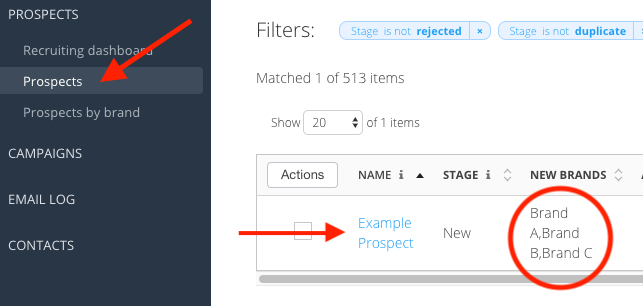
- Actions taken in the Prospects section are generally taken against the entire record, which contains all associated brands in one record.
Prospects by Brand
- Multi-brand scenarios. Used by agencies in conjunction with the Prospects workspace due to the brand-level breakdown of recruiting actions. This section keeps recruiting actions separate for each brand rather than grouped together in one record like in the Prospects section.
Function:
Brand-level detail on each Prospect record. If you have multiple brands in the system that you are recruiting for, you will see multiple entries for the same Prospect.
Example: If three brands are recruiting the same prospect, there could be three separate entries for that prospect in varying stages.
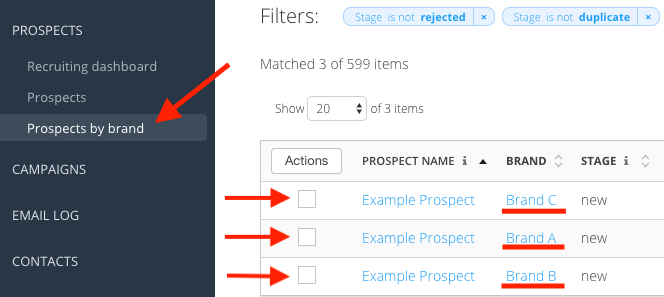
For more information on how the Prospects and Prospects by Brand stage bars interact see bottom of article here.
Partners
- Multi-brand scenarios. Used by agencies or multi-brand companies who reach out to partners in mass.
Function:
A summary of performance by each Partner in a single entry. All associated brands will be rolled up into the single Partner record like shown below:
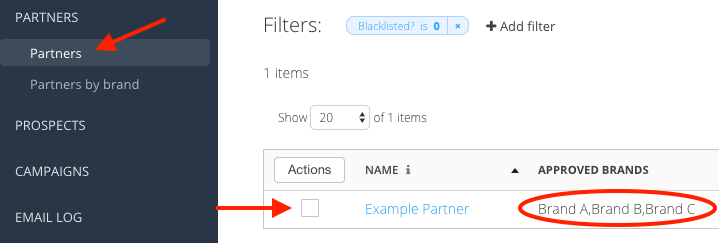
- Same difference in functionality as Prospects section
- All Partners who are currently joined to any brand’s program will appear here in a single joint record that incorporates all the brands whose programs the Partner is a part of.
Partners by Brand
- Primary workspace used by individual companies to monitor their current Partners
Function:
Brand-level detail on each Partner record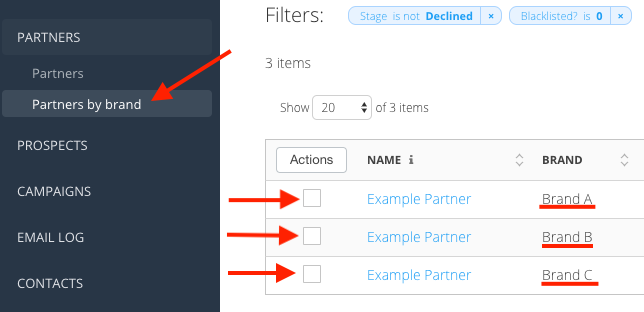
- Has more network-based columns as well as easier to understand performance metrics.
- This section is preferred by individual companies, as well as agencies depending on what actions they are taking.
Comments
0 comments
Article is closed for comments.