
What:
Mediarails makes it easy to mark your prospects as converted once they join your program or accept your offer. Please note this method is referring to the changing of a Stage. For manually converting a Prospect into a Partner, see instructions here.
Why:
Separating recruiting efforts from managing and optimizing your Partners not only makes it easier to separate workflows (and even work by teams), but also lets you track all your recruiting efforts and even recruiting results using the recruiting dashboard.
How:
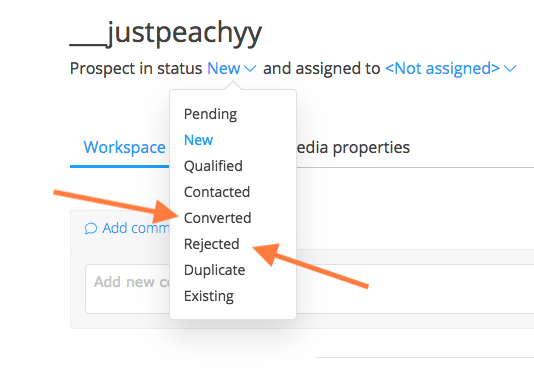
From the detail page of the prospect, select the status and either click Converted or Rejected. You can also assign the prospect to a particular team member by selecting a name from the assigned to list.
Note:
- Converting a prospect in Mediarails does not accept them into your network program - you have to do that in the network.
Homework:
- Convert a prospect
- Reject a prospect
Comments
0 comments
Please sign in to leave a comment.