
What is happening when you connect your email via the Nylas application?
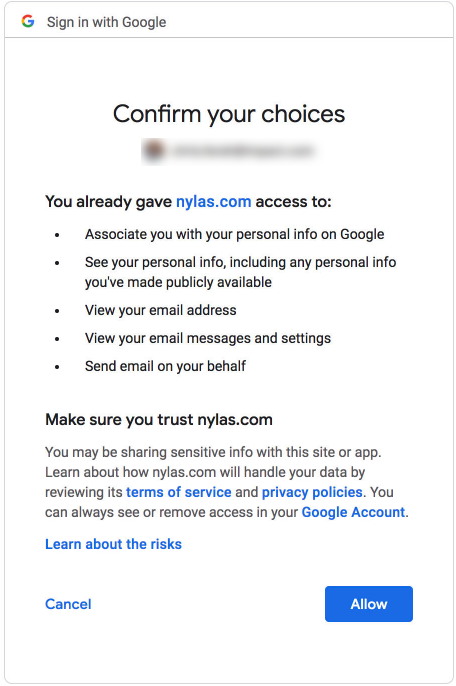
When you click the button in your Profile to Connect your email address, you go through a form that informs you of how the integration works in this particular use case (Nylas has different levels). Please see the screenshot below that represents what you see. After you agree to this connection, Nylas only interacts with your email for what it needs (emails sent through Mediarails and some account info) and stores anything that it accesses in a fully encrypted way.
The data is encrypted on the Nylas side and they do not store your username and password. They do not have access to your calendars, or contacts. Mediarails restricts Nylas to only the required scope when you connected the account. Mediarails only stores emails that are relevant to your partner communication. Other emails are filtered out and ignored. Never stored on our servers. Your email data is encrypted both at rest and in transit.
If you leave the platform, we de-provision the account and remove all email data. Your data is isolated on its own encrypted database as well. Nylas has significant security compliance certifications to protect your data and used by many CRMs in the industry. See links in Resources list for more details. In addition, Mediarails’s email security best practices have been reviewed by Google to ensure our process meets their security standards.
If after understanding more details of how the connection works you do not want to use our email alias feature on Mediarails, just disconnect your email account through Mediarails Profile page and it will be marked for deletion on Nylas’s system. The deletion should happen fairly quickly and within compliance of GDPR. An option some customers have gone with is Mediarails setting up email accounts for you which you can use just for partner communication.
Please let us know if you would like to learn more about this option. It essentially creates a new email address that is specifically used for Mediarails. We can help with acquiring a domain for you and setting up the email.
Any data that is stored and your connection to Nylas can be removed at any time from Nylas by you with a click of a button to Disconnect your Email address from your Profile page. Your profile page is located in the upper right corner of the tool under the round icon. Once in the Profile page there will be a Disconnect Button if you have previously connected.
What you agreed to when Connecting:
Resources:
Nylas Security Page
https://www.nylas.com/security/
Nylas GDPR Page
https://www.nylas.com/blog/gdpr-at-nylas-privacy-data-security-and-trust/
Comments
0 comments
Please sign in to leave a comment.