
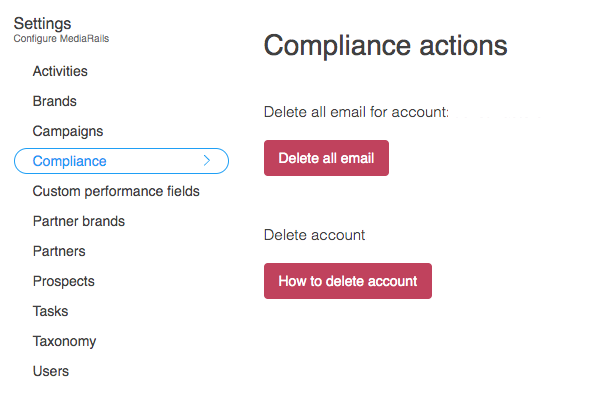
The Compliance tab in the Settings relates to global privacy policies and protection acts. This tab is to help you remain compliant while recruiting and contacting partners within the guidelines of your governing policies.
As such, this tab allows you to delete all email data and gives you information on how to delete your entire account.
Before reading over the options below, please be aware that these are PERMANENT changes, the Mediarails team will not be able to assist with recovering any lost data as that would negate the purpose of these compliance options and would also negate the privacy policies themselves. The Mediarails team does not hold or store your information anywhere but within your account.
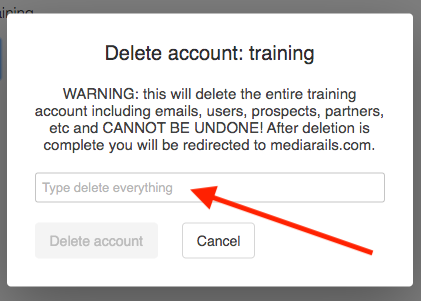
To avoid any accidental deletions, there are a few steps you'd have to take to be able to delete email or entire accounts. For example, if you wanted to delete your entire account, you would have to first type in "delete everything" before you could push the final Delete button. If you do write in "delete everything" and click through to delete, there is no turning back.
- The Delete all Email option is referring to all email data. This includes all email messages sent or loaded into Mediarails as well as breaking all user email connections.
- The Delete Account option will allow you to delete your entire account. Please be aware that this is a permanent deletion and there is absolutely no way to retrieve any data or information. Your account will not exist in any way so you will not be able to log back in or even locate it. After deleting the account you will be redirected to Mediarails.com as your account will no longer exist.
As more regulations are put into place in the future, Mediarails will continue to add options for privacy and data protection compliance in this section.
Comments
0 comments
Please sign in to leave a comment.